Browserbase-Powered Flight Price Tracker
[COMPLETE]An autonomous flight price monitoring system using Stagehand and Browserbase to scrape Google Flights with AI, track price history, and serve results via a local dashboard.

Browser automation has been around via Puppeteer and Playwright (Google and Microsoft software, respectively) for a while now – it's key for capturing info from the web when there isn't an API to call or you need to fill out forms/send information to a site (pulling or pushing data). The issue is, websites change frequently. Pre-Claude Code/Cursor, devs would spend a lot of time writing scripts to automate tasks. Updating them after site changes was just a part of life.
Just as LLMs changed the way people look at problems software can solve, this company Browserbase is changing how people look at interacting with the web in an automated/agentic way. In ye olden days, your web automations break as soon as a web element is renamed or moved a few pixels. If you had a human doing this automation and they were faced with the change, they'd have no problem using context clues and general judgement figuring out what the goal is – log in, find the About Us section, find Book Call button and screenshot the calendar, any of that is obvious to figure out for a human with a specific goal in mind.
Browserbase is changing this at the framework level with Stagehand, their developer‑first, AI‑native automation toolkit that replaces brittle selector scripts with semantic, resilient interactions. Paired with LLMs, you can say "go find out whether XYZ company has a Book Demo button on xyz.com" instead of writing however many lines of code it used to take to do the same job. The key difference is your workflow will continue working even if the target site changes their layout. This project is a simple example of doing this on an extremely basic level.
AI-Powered Web Scraping
Traditional web scraping is brittle. CSS selectors break when sites update their UI. Google Flights in particular is a nightmare of dynamically-generated class names.
This project uses Stagehand, an AI-powered browser automation library from Browserbase. Instead of writing fragile selectors like div.gws-flights__price-grid > span:nth-child(2), I describe what I want in plain English:
const results = await stagehand.extract(
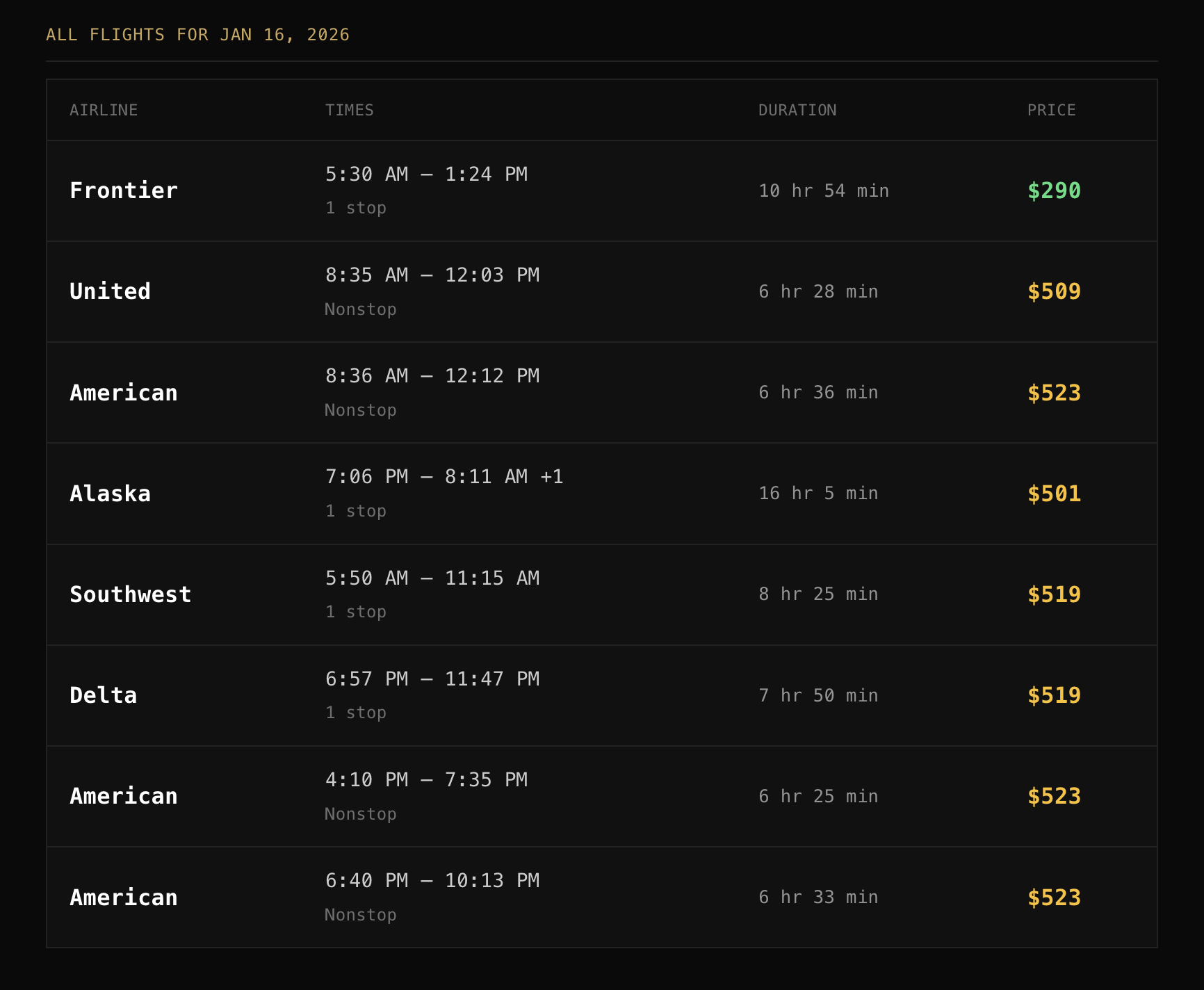
  `Look at the flight search results and extract the top 5 best flight options.
   For each flight, get: airline name, departure time, arrival time,
   total travel time, number of stops, and the price.`,
  z.object({
    flights: z.array(z.object({
      airline: z.string(),
      times: z.string(),
      duration: z.string(),
      stops: z.string(),
      price: z.string(),
    })),
  })
);
The AI understands the page structure and extracts exactly what I need. When Google updates their UI, the extraction still works because it's interpreting the content semantically rather than following a rigid DOM path.
Architecture
The system has three components:
- Flight Search Script - Navigates to Google Flights, waits for results to load, and uses Stagehand's extract API to pull structured flight data
- Daily Scheduler - A macOS LaunchAgent that runs the search every morning at 8 AM and appends results to a JSON file
- Web Dashboard - A Bun-powered HTTP server that displays the current cheapest flight, all options, and a 14-day price history chart
All browser automation runs in Browserbase's cloud infrastructure, so there's no local Chromium instance eating RAM. Each search session is recorded with a link back to Browserbase for debugging.
The Dashboard
The dashboard is a single TypeScript file serving HTML with embedded JavaScript. It shows:
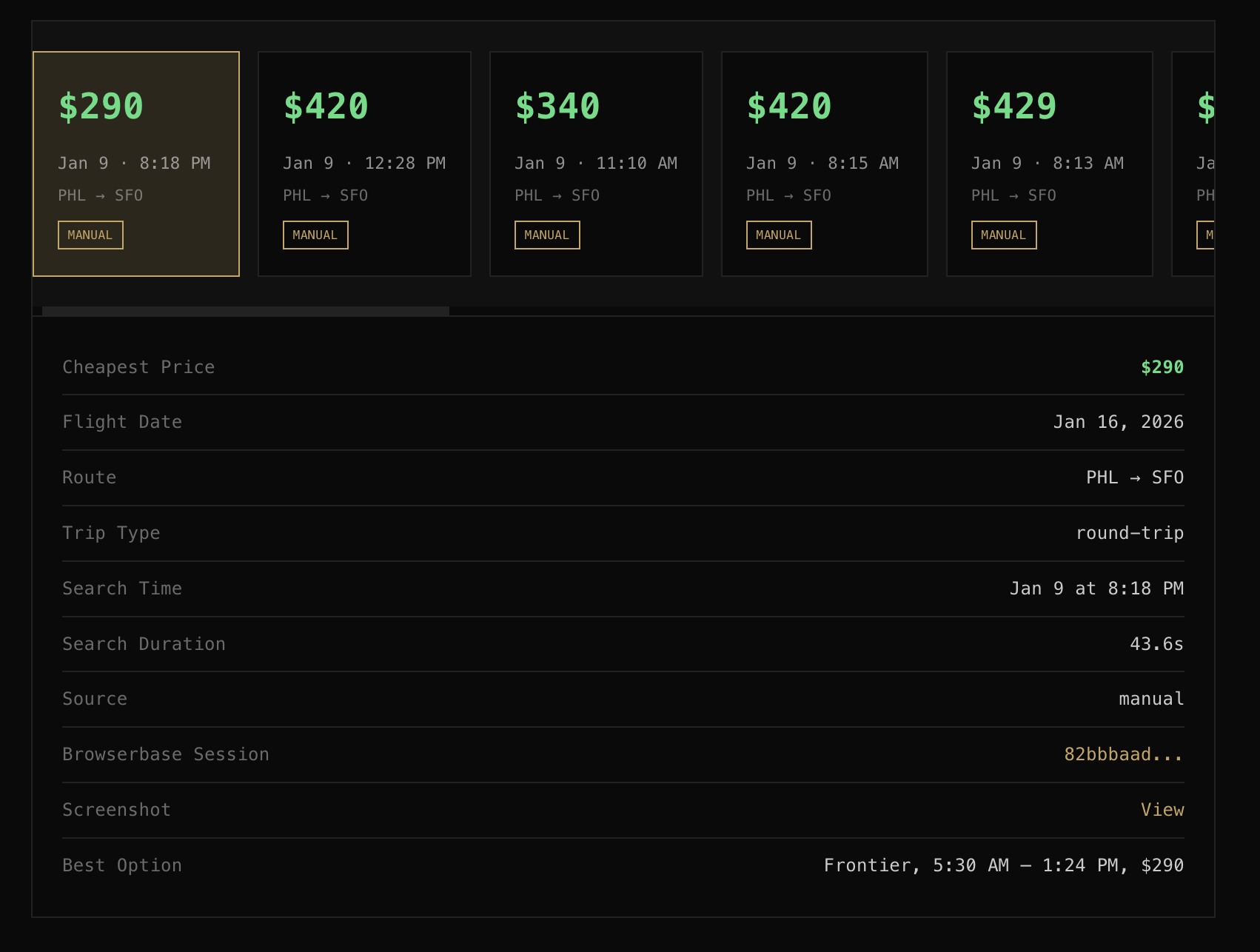
- Current cheapest flight with airline, times, and price
- Full list of available flights sorted by price
- Price history chart showing how the cheapest option has changed over time
- Direct links to Browserbase session recordings for each search
It's designed as a PWA with a dark theme, so I can check it from my phone via Tailscale.